Dashboard Files
The DashAPI is designed to:
- Load dashboard files
- Save dashboard files
.dash files are dashboard files.
The DashAPI enables users to easily create a new dashboard or modify an existing one.
Connected Folders
Dashboard files occasionally need connected folders, depending on the type of data. When a .dash file is called, if the dashboard requires any additional connected folders, they will be created automatically in the same directory as the .dash. Row64 can have several connected files for each .dash source file.
Connected folders are created automatically, if they're needed. These connected folders are given the same name as the source .dash file. Connected folders and files files are generally created when loading geo files, images, and markers.
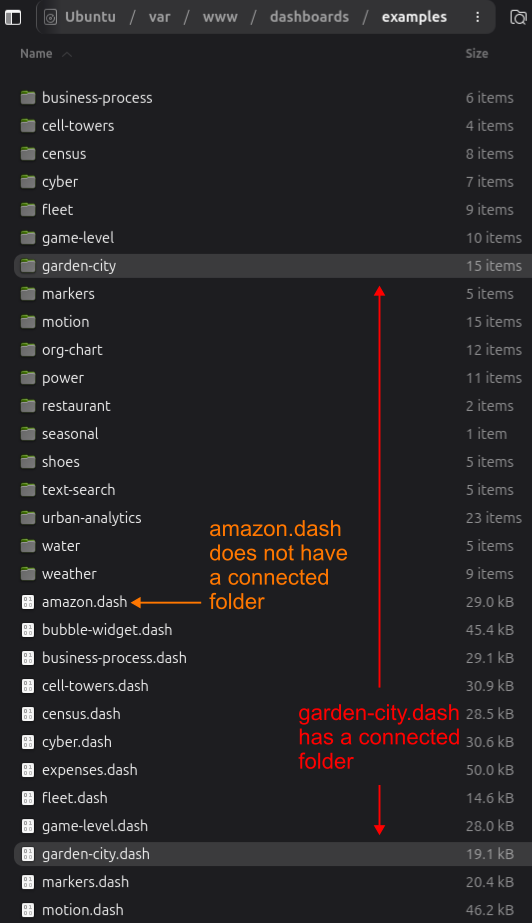
For example, in the /var/www/dashboards/examples directory, some, but not all, of the .dash files have folders with matching names. As a specific case, the garden-city.dash file has a connected folder, called garden-city, at the same directory level. The amazon.dash file, however, does not have a connected folder, since it is not needed.
Map and Diagram Files
Map and diagram files use the .geo and .geoz extensions.
- A
.geofile is the uncompressed message for the .geo layer with all communication tags. - A
.geozis the same as a.geo, but with max-level z-lib compression and all headers stripped off.
When the server needs to manipulate parts of a file, it needs to quickly grab parts of the bytestream and skip the decompression step. For example, cross-filtering with lasso selection is calculated on the client GPU, but sent to the server as a layer to be processed.
When the client needs the layer, we want to send it without any time lost due to compression. So, it sends the .geoz file either to RAM or the SSD.