Pane Formatting
The DashAPI enables users to color and label dashboard panes. To format panes, the dash.set_pane_def() function is called and supplied with the name of a pane to format, along with formatting options. Each instance of dash.set_pane_def() can only format one pane at a time, so multiple function calls are necessary for customizing multiple panes.
The arguments for dash.set_pane_def() include name of the pane to format, which should match a pane name in the pane list (pList) block, along with a list of formatting options. The format options list can include multiple list items, and each list item is encapsulated with brackets [ ] and separated by commas. Each list item customizes a single component of the dashboard, such as the background color, the text, the text formatting, and so on. List items might require one or more formatting options, depending on the component being formatted.
The following expresses the syntax of the function with arguments:
dash.set_pane_def("PANE_NAME", [["FORMAT_OPTION",VALUE],["FORMAT_OPTION","VALUE_1","VALUE_2"]])
- PANE_NAME
- The name of the pane to format.
- This argument is a string value that should match a pane's name from the pane list, which can be viewed from either the pList block in the Python configuration or in the terminal by using the log function.
- FORMAT_OPTION
- States which formatting option to target.
- Acceptable values are strings within quotation marks and can include options such as
"Color"or"Text".
- VALUE
- The VALUE argument is the value supplied with the format option that alters the actual formatting.
- The FORMAT_OPTION specifies which element to format, and the VALUE is the actual value that changes the element's formatting.
- The VALUE argument can be a variety of formats, such as a hexacedimal number or a string. The required format for VALUE is dependent on the selected element.
- A FORMAT_OPTION selection might require multiple VALUE arguments. For example, when customizing the text on a pane, the first VALUE would need to be the text to print to the pane, and the second VALUE would be the text format code to format the text.
The following image depicts an example dash.set_pane_def() call:
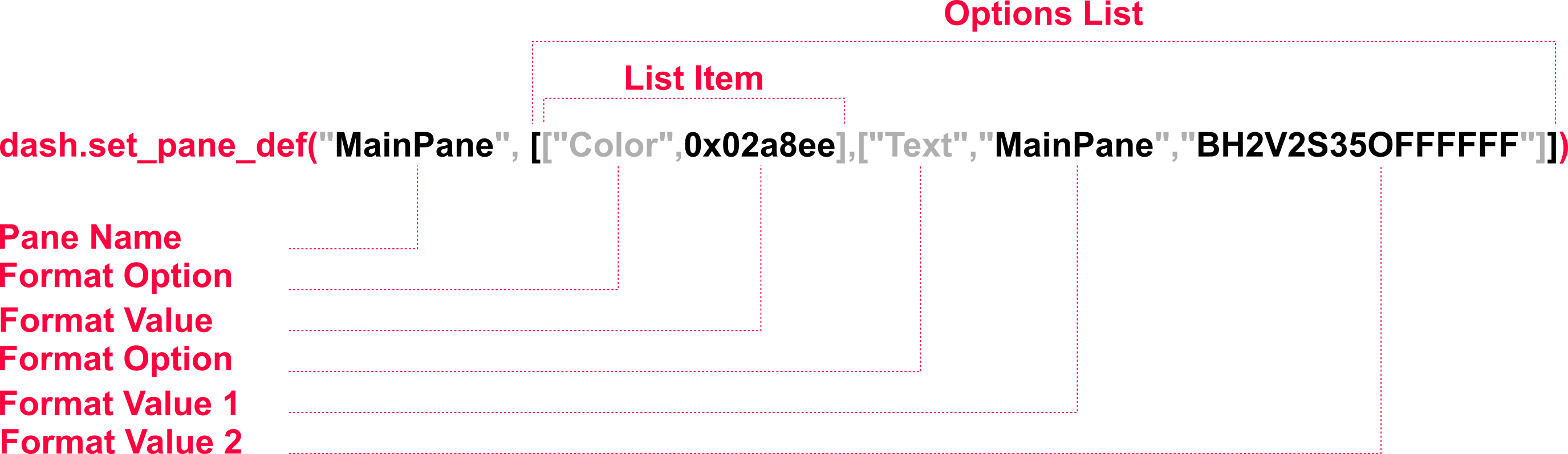
The example in the above image selects a pane, called MainPane, from a dashboard to format. After selecting a pane, the options list is provided with some list items. In the first list item, the Color option is selected, which changes the pane's color. After the Color option is a hexadecimal value that defines the color itself. The second list item selects Text as the format option, which customizes the text on the dashboard pane. This format option requires two values: the text to print to the pane and a format code to format the text.
The following is an example of using pane formatting in a basic dashboard:
from row64tools.dash64 import dash64
dash = dash64("/var/www/dashboards/temp/layout.dash")
pList = [
    ["Main",                "",                 "1000",         "800",      "y"],
    ["Header",              "Main",             "*",            "15%",      "" ],
    ["BottomPane",          "Main",             "*",            "*",        "x"],
    ["Footer",              "Main",             "*",            "10%",      "" ],
    ["Bar",                 "BottomPane",       "20%",          "*",        "" ],
    ["MainPane",            "BottomPane",       "*",            "*",        "" ],
    ["RightBar",            "BottomPane",       "20%",          "*",        "" ]
]
dash.Layout.set_panes(pList)
dash.set_pane_def("Header", [["Color",0xa2e9dc],["Text","Header","BH2V2S35"]])
dash.set_pane_def("Bar", [["Color",0x0344b9],["Text","Bar","BH2V2S35OFFFFFF"]])
dash.set_pane_def("MainPane", [["Color",0x02a8ee],["Text","MainPane","BH2V2S35OFFFFFF"]])
dash.set_pane_def("Footer", [["Color",0x008480],["Text","Footer","BH2V2S35OFFFFFF"]])
dash.set_pane_def("RightBar", [["Color",0xba2279],["Text","RightBar","BH2V2S35OFFFFFF"]])
dash.save()
Below the pane list (pList) are multiple calls to dash.set_pane_def(), which are used to customize the visible panes on the generated dashboard (Header, Bar, MainPane, Footer, and RightBar).
This code generates the following dashboard:
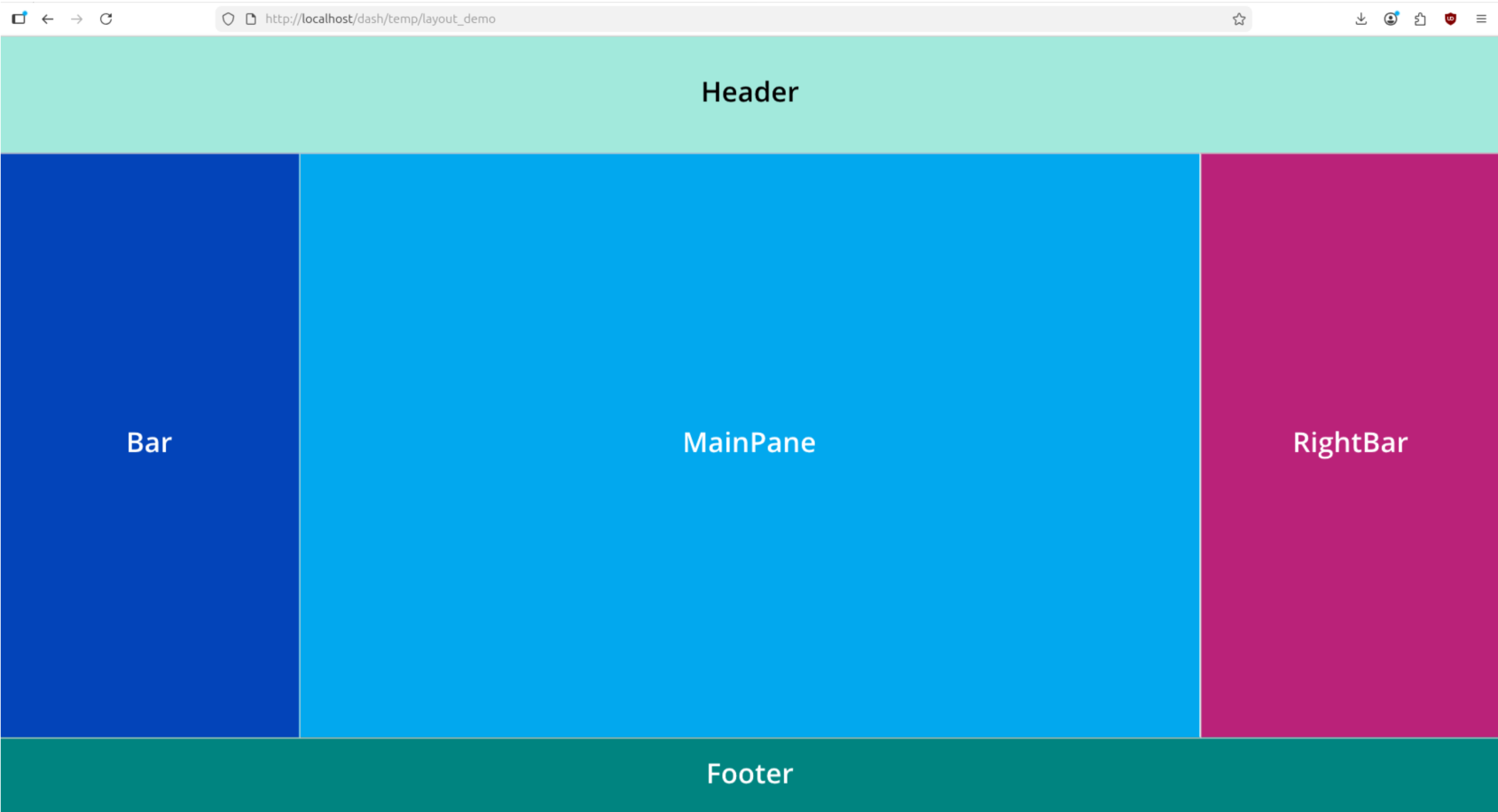
In the example Python code, each instance of dash.set_pane_def() formats a particular pane, identifying the pane to format using its name. After the pane name, a background color is defined using a hexadecimal code, and text is added to the pane and formatted using a format code.
Format Codes
Text is customized using format codes. The above example above uses format codes in each instance of the dash.set_pane_def() since each pane has text. An example of a format code from the above code is: BH2V2S35OFFFFFF. To learn more about format codes, please see the Text Formatting article.